Two things: A technique and a coloring tut.
Technique: Wanna enhance the quality of a pic without using the sharpen tool? This technique makes the picture brighter and of better quality without that.
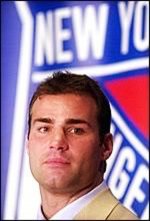
I start with this picture:
Take your base and duplicate the layer, setting it to soft light, 100%. Then, go to Filters and apply High pass with a Radius of 63 pixels to the soft light layer.
Simple, right? And the quality is immensely better! And I didn't do anything other than this to it. You can use this technique after you do coloring, or if you have a soft light base layer in your coloring, stick this in!
Tutorial: This tut looks best on medium-lighted pictures. Don't do anything too dark, or fix that first, or anything too washed out, cause it won't look good. Things with some shadowing, especially on the face, are good. Some yellow light is cool, because it ends up looking bluish. Well, you'll see. =p
I start with this base:
Go to New Layer/ Solid Color and put in #66140A and set it to Exclusion, 100%.
Go to New Layer/ Solid Color and put in #B9EDF7 and set it to Multiply, 80%.
Now duplicate your base layer and bring it to the top, setting it to Screen. Leave it at this opacity for now; we'll change it later.
Go to New Layer/ Solid Color and put in #C8EEEE and set it to Color Burn, 30%.
Go to New Layer/ Solid Color and put in #0C082C and set it to Exclusion, 100%.
Go to New Layer/ Solid Color and put int #F6E4F4 and set it to Color Burn, 100%.
Now, duplicate your base layer and bring it to the top, setting it to Luminosity at 100%. Duplicate the base again and bring it to the top, setting it to Soft Light at 100%. Now, that Screen base layer will almost definately not stay at 100%, so fool around with it until you get what you like. I really doesn't make this pic lighter; instead, it controls the amount of blue on the lighter areas, making the redder with the screen layer. I like it a little more blue, so I tend to make it less, but I left it at 100% for this one. This is what I got:
Kinda nice and soft looking, huh? I really liked it. Let me see what you got!


I've been using curves instead,but not sure if that is exactly the same...


 lol)
lol)
 That's awesome!!!


 My own tend to be... *cough* layer heavy.